$HL7 Viewer — Planned Workstation
For Development & Testing
$HL7 Viewer is a planned desktop utility for inspecting and parsing HL7 v2 messages during development, testing, debugging, and technical review.
It is being explored for healthcare IT, interoperability, migration, QA, and data teams that need to review HL7 message structure, segments, fields, and parsing issues using synthetic, redacted, or organization-approved test data.
These planned early-access tools are intended for development, testing, debugging, and technical review. They are not intended for clinical decision-making. Use synthetic or redacted data and follow your organization’s policies.
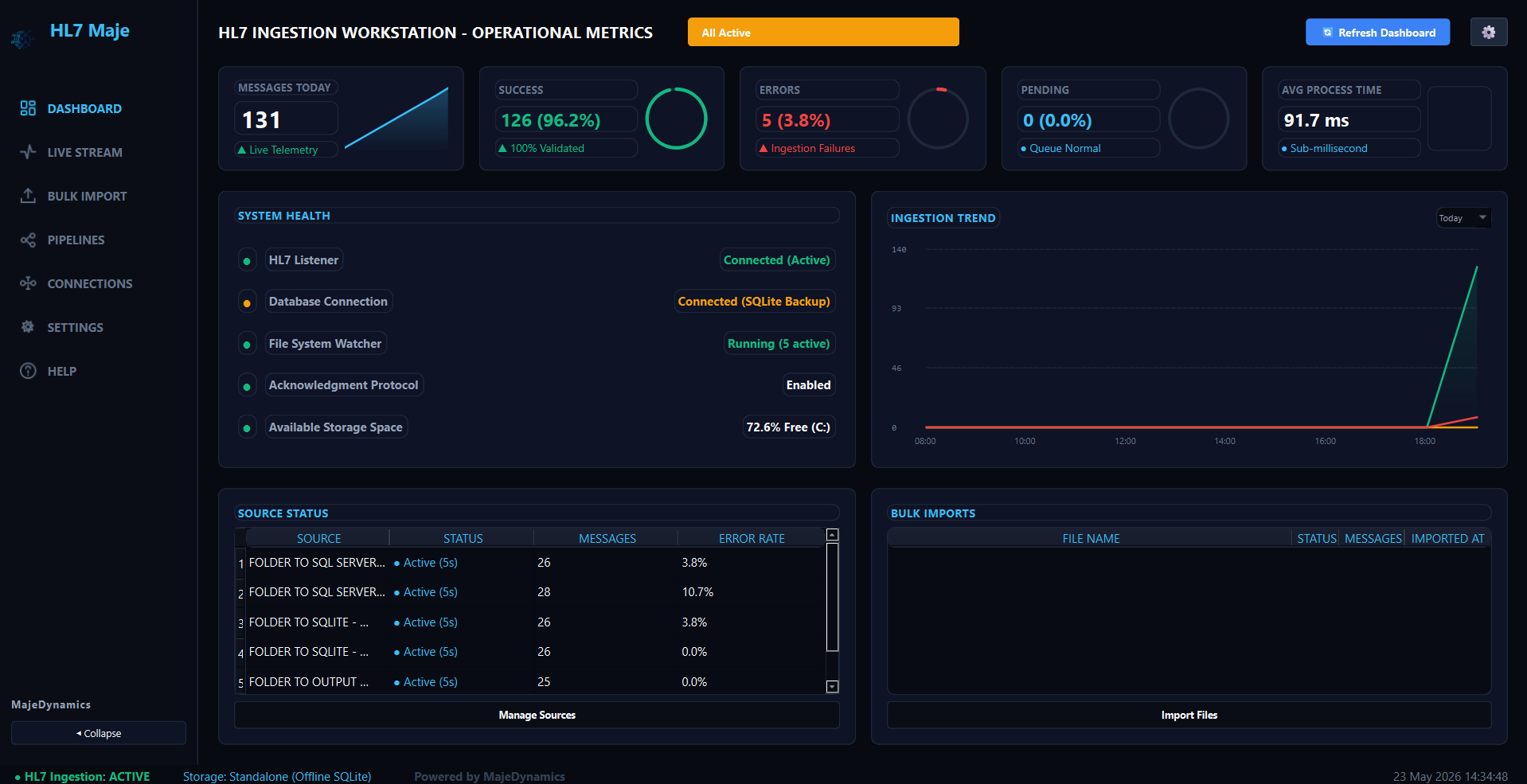
Early build interface preview. Final features, layout, availability, and packaging may change before release.
Planned for HL7 Engineering Workflows
$HL7 Viewer is being designed for high-volume local HL7 processing workflows. Bypass external runtimes and analyze data locally.
Interactive Dashboard
Planned dashboard for monitoring KPI metrics, storage destination mapping, and system health checks.
Live Stream Telemetry
A live feed to inspect streaming HL7 transactions with a detailed clinical segment tree, field-level maps, and raw highlight panes.
Bulk Batch Ingest
Planned batch ingest engine intended to help parse, validate, and index HL7 message packets with processing feedback.
Visual Route Designer
Being explored to help design and preview pipelines using folder watchers or TCP listener sockets, routing data to directories or SQL targets.
Multi-Engine Ingest Preview
Real-time pre-flight loader showing the exact database-specific SQL insert code or CSV payload that will be written.
Multi-Engine Destination Store
Supports PostgreSQL, Microsoft SQL Server, MySQL, SQLite, and CSV Folder connections with encrypted credential storage.
AES Credentials Vault
Stores pipeline and database credentials using AES-based local credential encryption, featuring one-click connection verification tests.
Clean Environment Reset
A robust Settings portal with confirmation validation that cleanly resets configurations and drops target database schemas.
Built for
HL7 Data Review
$HL7 Viewer is being explored as a desktop utility for reviewing HL7 v2 messages during development, testing, debugging, and technical review. It is intended to help teams inspect message structure, segment content, field-level issues, and interoperability problems before deeper pipeline or integration work.
Visual Workflow Routing
Deploy folder watchers or TCP MLLP channels locally and visually trace messages as they are routed to custom destinations.
HL7 Structure Review
Perform pre-flight parsing checks on clinical streams (ADT, ORU) to detect structural discrepancies before committing records.
Structured Database Loading
Populate relational schemas dynamically in PostgreSQL, SQL Server, MySQL, or local custom SQLite backup files.
Live Telemetry Debugging
Analyze transmission streams in real-time, matching parsed segment codes directly to highlighted raw text representations.
Staging Area Seeding
Extract historical HL7 message records (PID demographics, OBX outcomes) and format them into CSV files for ETL warehouses.
Environment Cleanups
Confirmation-based environment reset tools clear schemas and log entries across all local and external connection targets via a settings console.
Why Teams May Use $HL7 Viewer
Desktop-Native Performance.
Built for Modern Engineers.
$HL7 Viewer is being explored as a completely client-side utility utilizing natively compiled executables. No external dependencies or runtimes are required to split, parse, and analyze messages, supporting local processing while keeping data within your local environment.
Desktop-Native Speed
Designed to parse large batches of messages. Intended to process log files without heavy memory constraints.
Bypasses Complex Pipelines
Designed to work alongside engines like Mirth or Rhapsody. Check message structures locally before configuring complex channel rules.
{
  "hl7_version": "2.5.1",
  "conformance_rules": {
    "strict_delimiters": true,
    "require_msh": true
  },
  "tables": {
    "demographics": {
      "source_segment": "PID",
      "fields": {
        "mrn": "PID.3.1",
        "last_name": "PID.5.1",
        "first_name": "PID.5.2",
        "dob": "PID.7",
        "gender": "PID.8"
      }
    },
    "encounters": {
      "source_segment": "PV1",
      "fields": {
        "visit_class": "PV1.2",
        "attending_doc": "PV1.7.1",
        "admission_type": "PV1.4",
        "admit_date": "PV1.44"
      }
    }
  }
}Explore Labs Tools
Desktop tools offer local data inspection to help view, parse, and review HL7 transactions during technical testing.
HL7 Viewer FAQ
What is HL7 Viewer?
${SiteConfig.products.hl7.name} is a planned local utility designed for development, testing, debugging, and technical review. It is intended to help developers and analysts view HL7 v2.x messages, dissect segments, perform parsing, and preview ingestion into local databases.
Does it support batch processing?
${SiteConfig.products.hl7.name} is planned to include a parsing engine designed to read batch HL7 files. It is intended to help split, parse, validate, and preview records for local databases concurrently.
Is it suitable for interface teams?
${SiteConfig.products.hl7.name} is intended to help interface engineers and integration teams quickly inspect and debug HL7 messages pulled from EHR systems (like Epic, Cerner, or Meditech) during development.
Can it ingest HL7 data into databases?
The tool is being explored to include loaders that map hierarchical HL7 structures (like Patient Demographics in PID, Encounter details in PV1, or Lab Results in OBX) into flat SQL rows, allowing you to preview loading messages into PostgreSQL, Microsoft SQL Server, MySQL, or local JSON tables.
Who should use ${SiteConfig.products.hl7.name}?
${SiteConfig.products.hl7.name} is being explored for healthcare integration developers, interface engineers, Health IT project leads, and clinical data analysts who may need local analysis utilities during technical review.
Is ${SiteConfig.products.hl7.name} clinical decision support software?
No. ${SiteConfig.products.hl7.name} is not an EHR, diagnostic system, treatment recommendation tool, or clinical decision support system. It is an offline interoperability utility for HL7 v2 viewing, parsing, validation, transformation, migration, and operational data loading.
Does Efneze need access to customer PHI for support?
Efneze does not intentionally require PHI for standard support. Support requests should use synthetic, redacted, or organization-approved test data. Users should avoid submitting PHI, credentials, or sensitive production data unless explicitly permitted by their organization’s policies.
Who is responsible for validating mappings and loaded output?
Customers are responsible for reviewing and validating mappings, transformations, destination schemas, and loaded outputs before using the data in downstream or organization-approved workflows.