$Forge — Planned WorkstationFor Development & Testing
Early Access Desktop Tool for Large File Inspection
$Forge is a planned desktop utility for inspecting flat files, delimited files, fixed-width files, and raw data extracts during development, testing, debugging, and technical review.
Designed for developers, data engineers, analysts, and integration teams who need to understand large operational datasets before loading them into databases, pipelines, or downstream systems.
These planned early-access tools are intended for development, testing, debugging, and technical review. They are not intended for clinical decision-making. Use synthetic or redacted data and follow your organization’s policies.
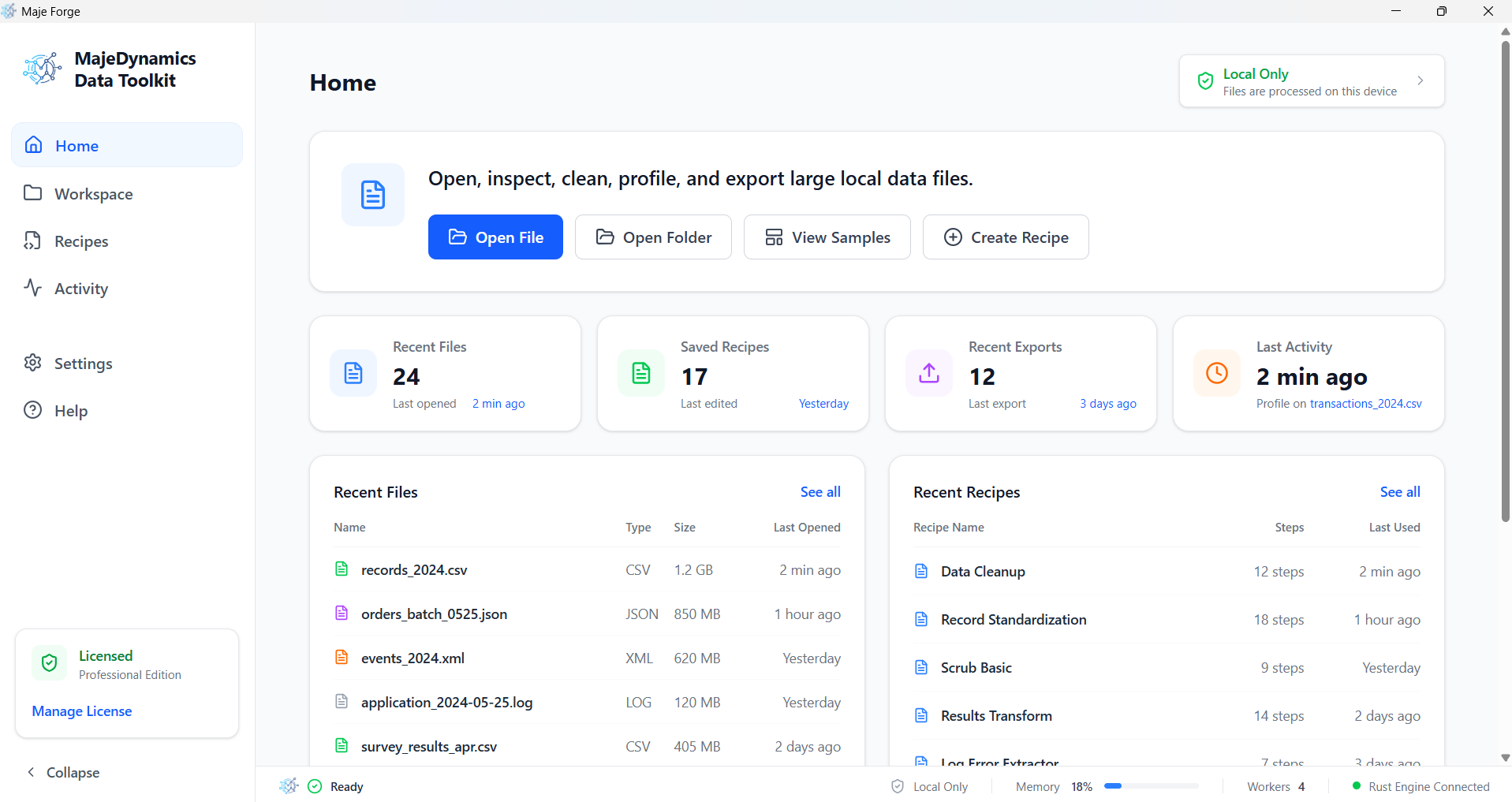
Tabular Processing at Technical Scales
Reduce reliance on spreadsheets and general DB client utilities for large file review. $Forge is intended to help teams quickly understand unfamiliar datasets.
Large File Inspection
Large File Viewer
Inspect large CSV, TSV, TXT, pipe-delimited, and fixed-width files using memory-conscious reading patterns where supported. Designed for smooth grid navigation, column search, and fast row-level review.
CSV / TSV / Delimited File Inspection
Open common structured text formats including CSV, TSV, pipe-delimited files, custom-delimited exports, log-style datasets, and raw operational extracts with delimiter detection and configurable parsing options.
Gigabyte-Scale File Analysis
Designed to support large files using streaming and memory-efficient reading patterns, helping users inspect large datasets without relying on heavy spreadsheet tools.
Fixed-Width File Support
Inspect legacy fixed-width files by defining column positions, widths, headers, and parsing rules. Useful for mainframe extracts, billing files, operational exports, and data migration files.
Profiling and Validation
Data Profiling
Review column-level statistics such as row counts, null values, distinct values, common patterns, min/max values, field lengths, and basic data quality signals before loading data into downstream systems.
Schema Detection
Help infer column names, data types, delimiters, field lengths, date patterns, and likely parsing issues to speed up first-pass file understanding.
Bad Row Detection
Identify malformed rows, inconsistent column counts, invalid delimiters, broken quotes, encoding issues, and rows that may fail during database or pipeline ingestion.
Column Search and Filtering
Search, filter, sort, and inspect columns using text search, regex filters, value matching, and quick column-level statistics.
Preparation and Handoff
Data Cleansing Rules
Define lightweight cleanup rules to trim whitespace, strip carriage returns, normalize empty values, repair common timestamp issues, filter corrupt lines, and prepare files for technical review or loading.
Import Mapping
Map source columns to target database fields, rename columns, define expected data types, and preview transformation issues before loading or exporting.
Database Loading Preview
Prepare raw datasets for loading into PostgreSQL, SQL Server, or other downstream systems by reviewing structure, detecting errors, and validating file readiness before ingestion.
Export and Reporting
Export cleaned samples, rejected rows, profiling summaries, validation results, and technical review reports for documentation or handoff.
Operational Workflows
Operational Dataset Review
Inspect demographics extracts, provider directories, claims-style files, encounter logs, inventory files, billing exports, portal trace logs, and other operational datasets before downstream processing.
Lightweight Desktop Processing
Designed as a local desktop utility for fast technical inspection of large files without depending on browser memory limits or spreadsheet row limits.
Rapid Technical Review
Perform fast text search, row sampling, sorting, regex filtering, data profiling, and issue detection to quickly understand unfamiliar datasets.
Built for
Large File Review
$Forge is being explored as a desktop utility for reviewing large CSV, TSV, pipe-delimited, fixed-width, and raw operational data files during development, testing, debugging, and technical review.
It is intended to help teams inspect file structure, parsing issues, column patterns, malformed rows, and data quality signals before deeper database loading or pipeline work.
Operational Reporting Review
Open, review, and filter daily operational encounter logs, admission files, and portal analytics exports locally.
Data Preparation Workflows
Preview and prepare large operational files for loading into PostgreSQL, MySQL, or SQL Server staging structures before writing Python scripts.
Data Warehouse Staging
Extract and inspect raw tabular exports to help review staging layers before data warehouse integration.
Analytics Preparation
Quickly standardise patient directories and logs, mapping headers and fixing missing data points before analytics ingestion.
Raw Export Inspection
Verify that raw system reports conform to expectations, discovering structural, delimiter, or record errors.
ETL Support Workflows
Provide support for advanced operational extraction, cleaning, and staging of datasets locally at the edge.
Why Teams May Use $Forge
Memory-Mapped Efficiency.
Designed for Large Datasets.
Opening large CSV files in desktop tools like Excel can lead to memory crashes because they read the entire file into RAM at once. $Forge is designed to help navigate and review large files using streaming and memory-efficient reading patterns, allowing you to inspect files containing many rows with reduced memory constraints.
Handles Large Flat Files
Scroll, filter, and inspect very large files with reduced memory constraints.
Local Desktop Processing
Operational data is processed locally on your machine during normal use, helping reduce unnecessary data movement and transmission latency.
{
  "delimiter_auto_detect": true,
  "data_types": {
    "mrn": "integer",
    "encounter_date": "datetime",
    "npi": "string"
  },
  "null_replacement": {
    "string": "UNKNOWN",
    "integer": 0,
    "datetime": "2026-05-17T00:00:00"
  },
  "cleaning_pipeline": [
    "strip_header_whitespace",
    "remove_carriage_returns",
    "validate_npi_format"
  ],
  "concurrency_settings": {
    "io_threads": 4,
    "parsing_threads": 8
  }
}Explore Labs Tools
Desktop tools offer local data inspection to help view, parse, and review tabular datasets during technical testing.
Forge FAQ
What file formats are supported?
Forge supports common flat-file and tabular data structures including Comma-Separated Values (CSV), Tab-Separated Values (TSV), pipe-delimited files, custom delimited text files, and fixed-width flat files.
Can Forge ingest data into databases?
Forge includes database loading preview and preparation workflows, helping users review structure, detect errors, and validate file readiness before ingestion into PostgreSQL, SQL Server, or other downstream systems.
Is it suitable for large datasets?
Yes. Forge is designed to help inspect large CSV files using streaming and memory-efficient reading patterns where supported.
Who is Forge designed for?
Forge is designed for developers, data engineers, analysts, and integration teams who need to understand large operational datasets before loading them into databases, pipelines, or downstream systems.
Can it support ETL workflows?
Yes, it provides data preparation capabilities to help inspect datasets, identify bad rows, and run lightweight cleansing rules before files are staged in ETL pipelines.
Is Forge clinical decision support software?
No. Forge is not intended for clinical decision-making, diagnosis, or treatment decisions. It is an offline desktop utility for inspecting, cleansing, validating, and staging raw operational datasets. Use synthetic or redacted data and follow your organization’s policies.
Does Efneze need access to customer PHI for support?
Efneze does not intentionally require PHI for standard support. Support requests should use synthetic, redacted, or organization-approved test data. Users should avoid submitting PHI, credentials, or sensitive production data unless explicitly permitted by their organization’s policies.
Who is responsible for validating cleaned or loaded output?
Users are responsible for reviewing and validating cleansing rules, transformations, destination schemas, and loaded outputs before using the data in downstream workflows.